
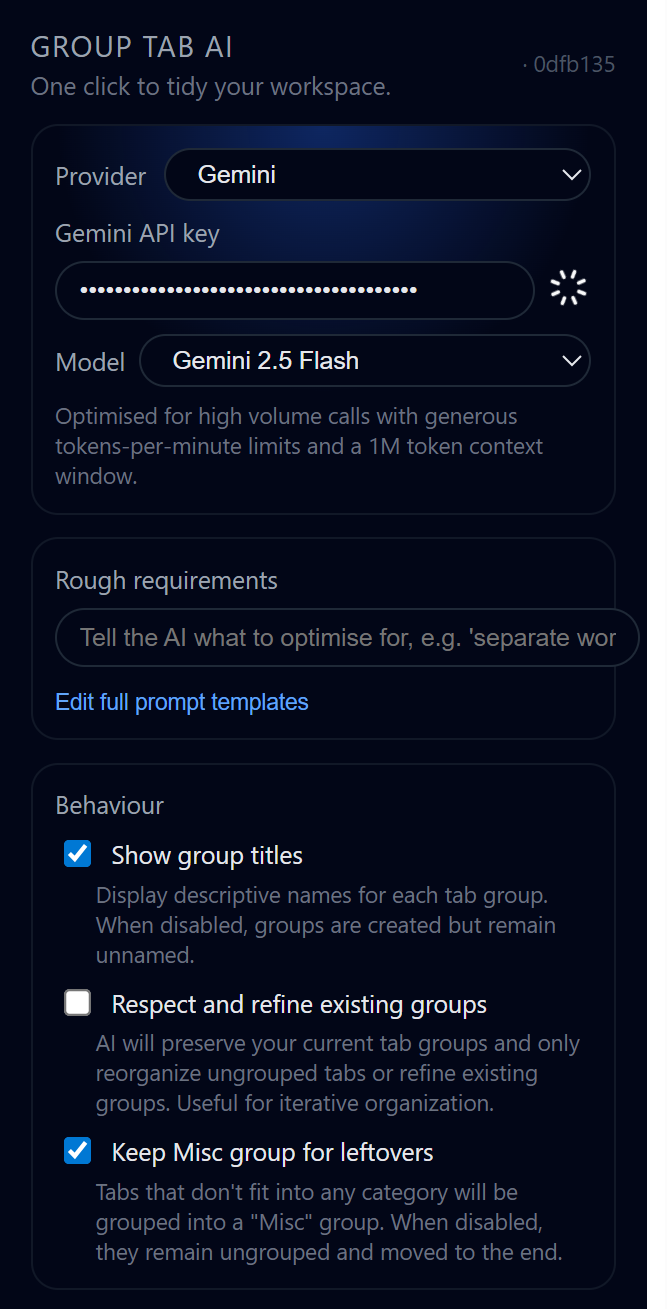
Group Tab AI Extension
A browser extension that uses ChatGPT/Gemini to group your browser tabs into logical categories

Hung Nguyen Quoc
Maker • 22 tháng 5, 2026
Mô tả chi tiết
An intelligent browser extension that uses advanced AI (OpenAI/Gemini) to automatically organize your browser tabs into logical, context-aware groups. Goes beyond simple domain-based grouping by analyzing actual page content, understanding your workflow, and learning from your preferences.

Key Features
Intelligent Content Analysis
-
Deep Context Understanding: Analyzes page titles, descriptions, headings, and body content
-
Smart Grouping: Groups by task/activity, not just domains
-
Multi-Domain Intelligence: Handles 30+ tabs from same domain by splitting into topic-specific groups
-
Universal Applicability: Works for all professions (developers, designers, marketers, researchers, students, etc.)
Advanced AI Capabilities
-
Dual AI Provider Support: Choose between OpenAI (GPT-4, GPT-3.5) or Google Gemini
-
Optimized Performance: Gemini configured with
thinkingBudget: 0for faster responses -
Context-Rich Prompts: Sends up to 800 characters of page context per tab
-
Customizable Prompts: Edit AI prompts directly in the extension
Learning System (NEW!)
-
Behavior Tracking: Records your manual tab grouping actions
-
Pattern Recognition: AI analyzes your preferences and workflow patterns
-
Insight Generation: Discovers your grouping preferences automatically
-
Prompt Auto-Improvement: AI suggests prompt revisions based on your behavior
-
Accept/Reject System: Review and approve AI-generated insights
Modern UI/UX
-
Clean Interface: Beautiful dark-themed popup with gradient accents
-
Real-time Feedback: Progress indicators, status messages, and toast notifications
-
Multi-Tab Interface: Separate tabs for Settings, Prompts, and Learning
-
Visual Status: Badge shows elapsed time during grouping operations
Flexible Configuration
-
Keep Existing Groups: Option to preserve and refine current groups
-
Special Requirements: Add custom instructions for grouping behavior
-
Show Group Names: Toggle AI-generated names in tab groups
-
Keyboard Shortcuts:
Alt+Qto group,Alt+Ato ungroup all tabs
Installation
From Release (Recommended)
-
Download the latest release
-
Unzip the downloaded file
-
Open Chrome/Edge and navigate to
chrome://extensions/ -
Enable "Developer mode" (toggle in top right)
-
Click "Load unpacked" and select the unzipped folder
Setup
-
Click the extension icon to open the popup
-
Go to Settings tab
-
Choose your AI provider (OpenAI or Gemini)
-
Enter your API key:
-
OpenAI: Get from platform.openai.com/api-keys
-
Gemini: Get from aistudio.google.com/api-keys
-
-
Select your preferred model
-
Configure optional settings (keep existing groups, special requirements, etc.)
Development
Prerequisites
-
Node.js (v16+)
-
PNPM package manager
Setup
git clone [https://github.com/quochung-cyou/group-tab-ai-extension.git](https://github.com/quochung-cyou/group-tab-ai-extension.git%5C) cd group-tab-ai-extension
pnpm install
Bình luận (0)